
Donation Details

SHARE THIS:

Post Title

Thank you for supporting our cause!

Please select your preferred method of donation from the options listed below.
We deeply appreciate your support and generosity.

Online Transfer

To donate, please fill out the necessary details with accurate information.
After filling out the form, please click the “Submit” button to proceed to the payment registration page.


Official Donation Form


Data Privacy


Pursuant to the Data Privacy Act of 2012 (Republic Act 10173), I hereby give my consent to the collection and sharing of the above personal information. I hereby certify that all responses to this form are true and accurate. I understand that the processing of my personal information shall be limited to the processing of my donation and confidentiality shall be maintained by Angat Buhay.


GCash

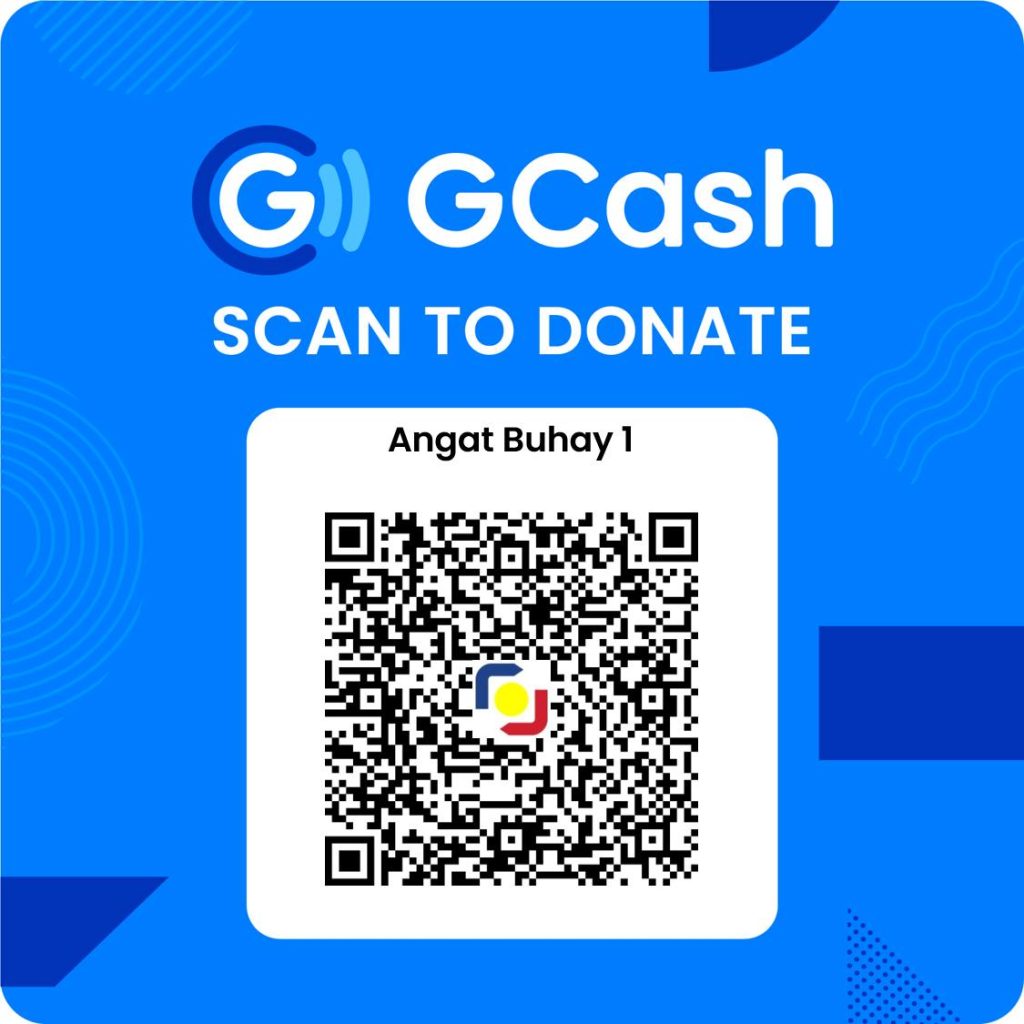
How to Donate via GCash QR Code

  1. Open Your GCash App: Launch the GCash application on your smartphone. If you haven’t already, make sure to log in to your account.
  2. Select ‘Pay QR’: From the dashboard, tap on the ‘Pay QR’ option. This may also appear as ‘Scan QR Code’ depending on your app version.
  3. Scan the QR Code: Use your phone’s camera to scan the QR code provided for donations. Ensure the QR code is clearly visible for easy scanning.
  4. Enter the Amount: Once the QR code is recognized, you will be prompted to enter the amount you wish to donate.
  5. Confirm Your Donation: Review the details of your transaction to ensure everything is correct. Then, confirm your donation by tapping the ‘Pay’ button.
  6. Successful Donation: You will receive a confirmation message on your screen once the donation is successful. Keep this confirmation for your records.
Bank Transfer

BDO

Account Name: Angat Pinas Inc.
Account Number: 00 277 801 6986

BPI

Account Name: Angat Pinas, Inc.
Account Number: 0011-1921-65

How to Donate via Bank Transfer to Angat Pinas Inc.

For BDO (Banco de Oro) Transfers:

  1. Access Your BDO Online Banking: Log in to your BDO online banking account through the BDO Mobile App or the BDO Online Banking website.
  2. Navigate to Send Money: Select the ‘Send Money’ option from the main menu.
  3. Fill Out the Transfer Form:
    • For the recipient, select ‘Transfer to Another Local Bank’ or ‘Transfer to 3rd Party’ depending on your options.
    • Enter the account details as follows:
      • Account Name: Angat Pinas Inc.
      • Account Number: 00 277 801 6986
  4. Enter the Donation Amount: Specify the amount you wish to donate.
  5. Review and Confirm: Double-check the details of your transfer to ensure accuracy, then confirm the transaction.
  6. Keep the Confirmation: You will receive a confirmation of your transaction. Please save this for your records.

For BPI (Bank of the Philippine Islands) Transfers:

  1. Log Into BPI Online or Mobile App: Open the BPI Mobile App or access BPI Online Banking and log into your account.
  2. Select ‘Transfer Money’: Choose the ‘Transfer Money’ option and then ‘Transfer to another bank’ if prompted.
  3. Provide the Beneficiary Details:
    • For the recipient’s bank, select ‘BPI’.
    • Input the following account details:
      • Account Name: Angat Pinas, Inc.
      • Account Number: 0011-1921-65
  4. Input the Amount to Donate: Type in the amount of your donation.
  5. Confirm Your Details: Review the information you’ve entered for accuracy. Make sure the account name and number are correct.
  6. Complete the Transaction: Confirm and complete your transfer.
  7. Transaction Confirmation: Save or note down the confirmation of your donation for your records.
Give2Asia
Every.org


Please click here to proceed with your donation using every.org.

We apologize for the inconvenience, but our online transfer options below are currently undergoing enhancements.
Please explore the other tabs for alternative donation methods.

To donate, please fill out the necessary details with accurate information.
After filling out the form, please click the “Submit” button to proceed to the payment registration page.


Official Donation Form


Data Privacy


Pursuant to the Data Privacy Act of 2012 (Republic Act 10173), I hereby give my consent to the collection and sharing of the above personal information. I hereby certify that all responses to this form are true and accurate. I understand that the processing of my personal information shall be limited to the processing of my donation and confidentiality shall be maintained by Angat Buhay.


How to Donate via GCash QR Code

  1. Open Your GCash App: Launch the GCash application on your smartphone. If you haven’t already, make sure to log in to your account.
  2. Select ‘Pay QR’: From the dashboard, tap on the ‘Pay QR’ option. This may also appear as ‘Scan QR Code’ depending on your app version.
  3. Scan the QR Code: Use your phone’s camera to scan the QR code provided for donations. Ensure the QR code is clearly visible for easy scanning.
  4. Enter the Amount: Once the QR code is recognized, you will be prompted to enter the amount you wish to donate.
  5. Confirm Your Donation: Review the details of your transaction to ensure everything is correct. Then, confirm your donation by tapping the ‘Pay’ button.
  6. Successful Donation: You will receive a confirmation message on your screen once the donation is successful. Keep this confirmation for your records.

BDO

Account Name: Angat Pinas Inc.
Account Number: 00 277 801 6986

BPI

Account Name: Angat Pinas, Inc.
Account Number: 0011-1921-65


How to Donate via Bank Transfer to Angat Pinas Inc.

For BDO (Banco de Oro) Transfers:

  1. Access Your BDO Online Banking: Log in to your BDO online banking account through the BDO Mobile App or the BDO Online Banking website.
  2. Navigate to Send Money: Select the ‘Send Money’ option from the main menu.
  3. Fill Out the Transfer Form:
    • For the recipient, select ‘Transfer to Another Local Bank’ or ‘Transfer to 3rd Party’ depending on your options.
    • Enter the account details as follows:
      • Account Name: Angat Pinas Inc.
      • Account Number: 00 277 801 6986
  4. Enter the Donation Amount: Specify the amount you wish to donate.
  5. Review and Confirm: Double-check the details of your transfer to ensure accuracy, then confirm the transaction.
  6. Keep the Confirmation: You will receive a confirmation of your transaction. Please save this for your records.

For BPI (Bank of the Philippine Islands) Transfers:

  1. Log Into BPI Online or Mobile App: Open the BPI Mobile App or access BPI Online Banking and log into your account.
  2. Select ‘Transfer Money’: Choose the ‘Transfer Money’ option and then ‘Transfer to another bank’ if prompted.
  3. Provide the Beneficiary Details:
    • For the recipient’s bank, select ‘BPI’.
    • Input the following account details:
      • Account Name: Angat Pinas, Inc.
      • Account Number: 0011-1921-65
  4. Input the Amount to Donate: Type in the amount of your donation.
  5. Confirm Your Details: Review the information you’ve entered for accuracy. Make sure the account name and number are correct.
  6. Complete the Transaction: Confirm and complete your transfer.
  7. Transaction Confirmation: Save or note down the confirmation of your donation for your records.

Please click here to proceed with your donation using every.org.

Angat Buhay
Angat Buhay1 day ago
A NEW COMMUNITY KITCHEN FOR LEARNERS 🍴🩷

The R.V. Maramba Community Kitchen marks a step toward ensuring that more learners have the nourishment they need to learn, grow, and thrive.

The kitchen will help provide nutritious meals for learners who need them most, while supporting nutrition education, proper food handling, and stronger community participation. By helping address nutrition-related barriers that can affect a child’s concentration and participation in class, we hope to create better conditions for every child to learn and grow.

This facility also marks the first step toward a planned community kitchen network across the four quadrants of Naga City, with the goal of establishing a community kitchen in each quadrant that can help respond to the nutrition needs of schools and learners in the surrounding communities. Schools and local partners will take part in the continued management and sustainability of these kitchens. Before the turnover, Rise Against Hunger Philippines also conducted training on workplace safety and proper food handling for local implementers.

We are grateful to Mayor Leni Gerona Robredo, Jomar Fleras of Rise Against Hunger Philippines, Dr. Susan S. Collano of DepEd–Naga City, Ar. Dino Amiel Bongcayao of Bongcayao Architectural Design Studio, and Maria Rosario C. De Leon of Rosario V. Maramba Elementary School. We also extend our gratitude to our partners Rise Against Hunger Philippines, City Government of Naga, DepEd–Naga City, Bongcayao Architectural Design Studio, Rosario V. Maramba Elementary School, and Masflex Cookware & Kitchenware for making this shared vision possible.

Together, we continue to build healthier communities where children are better supported to learn, grow, and thrive! đź©·

Recent Stories:

Angat Buhay is a non-government organization accredited by the Philippine Council for NGO Certification (PCNC) and certified with ISO 9001:2015 – Quality management systems, ensuring its commitment to transparency, accountability, and operational excellence.

Contact us at: info@angatbuhay.ph

Copyright 2024. Angat Pinas Inc. All rights reserved. | Powered by Pixelzero Digital Solutions

ANGAT KALIKASAN TOOLKIT 2024 [Download]

This toolkit summarizes the principles and best practices discussed in Angat Kalikasan. These strategies support SKs in their role of enhancing community-level environmental governance through problem-solving approaches, stakeholder management, policy creation, advocacy campaigning, and monitoring. The toolkit includes activities and templates you can use to further develop and refine your environmental initiatives.